

NANO BANANA 2 IN TAKEWEAVE
Explore fast, reference-led image variations for products, characters, scenes, and creative concepts without rebuilding the brief from zero.
 IMAGE MODEL

Check current availability in Studio
TURN ONE REFERENCE INTO A FAMILY OF VISUAL DIRECTIONS.
Keep the subject recognizable, describe what should change, and generate alternative scenes, styling, crops, or campaign directions for review.
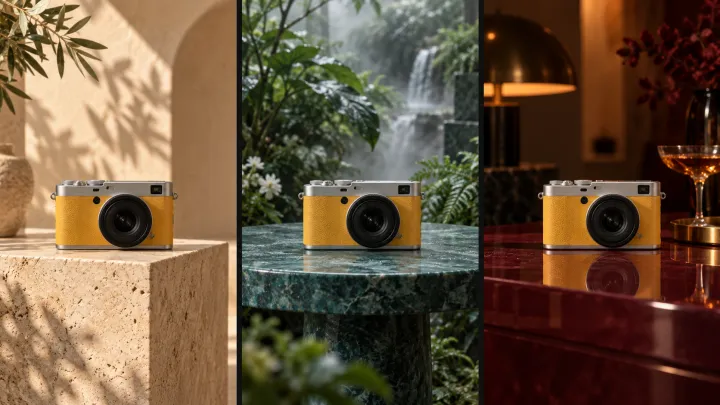
Example Input
- Primary reference image
- Focused change request
Variation Direction
- Scene or styling change
- Composition, crop, or mood change
Output Delivery
- Compare image variations
- Save selected results to Assets
WHEN NANO BANANA 2 FITS THE BRIEF
Use it when fast visual exploration and reference continuity matter more than a single heavily art-directed final.
Best for
 Rapid reference-based variations
Explore several visual directions from the same product, character, or source image.
- Product and social concepts
Test new scenes, crops, backgrounds, and campaign treatments around an existing asset.
- Iterative visual development
Continue from a selected result and refine one change at a time.
AVOID WHEN
 Exact brand and packaging reproduction
Review logos, labels, colors, proportions, and small product details.
- Final typography and layout production
Finish exact copy and layout in a design tool after selecting the visual direction.
- Large batches without review
Compare outputs in small groups so visual drift is caught before scaling.
Compare results for your own task; this is not a permanent leaderboard.
INPUTS, CONTROLS, AND ROUTING
Review input parameters, output settings, and current availability before you generate.
Supported Inputs
Supported Outputs
Eligible Controls
Availability Regions
Studio confirms the active image route, supported references, and output settings.
COSTS, RIGHTS, AND REVIEW BOUNDARIES
Review billing, usage rights, and technical limits before triggering generations.
Orchestrator Cost Rate
The Quote depends on the active route, image settings, and output count.
Commercial Use & IP Rights
Use only images and brand materials you are authorized to transform.
Hard Generation Limits
Review identity, product geometry, text, logos, colors, and fine details across every variation.
A final, precise Credit quote always appears in Studio before triggering generations.
USE NANO BANANA 2 IN YOUR TAKEWEAVE WORKFLOW
Choose between automated routing and manual model selection inside TakeWeave.

START WITH AUTO ROUTING
Add a reference and describe one clear change. Auto can recommend a compatible image route for review.

SELECT NANO BANANA 2 DIRECTLY
Choose Nano Banana 2 in Image Studio when available, add the primary reference, and generate a focused set of alternatives.
The workspace model selector and real-time quote preview confirm your final active route before generation.
SUPPORT & RELATED SYSTEMS
Got questions? Browse common scenarios or explore adjacent models.
Fast image exploration, reference-based variations, product scenes, character concepts, and iterative edits.
Use a clean primary reference and describe only the changes you want. Review every output for drift.
Yes. Save the result to Assets or use it as a reference for the next Image Studio iteration.
Studio displays the final Credits Quote before generation.