

AI video prompting
How to Write Image-to-Video Prompts
An image-to-video prompt explains what should happen after the starting image: what moves, how the camera behaves, and where the shot ends. Use the image to establish appearance and the prompt to describe motion.
Start with one main movement. Add supporting motion only when it helps the scene.
Check your image before writing the prompt
Look at the image as the first frame of a video. Check that the main subject is clear, important edges are intact, and the composition leaves room for the movement you want.
If a product's label matters, it needs to be readable in the source. If you need an accurate side or back view, collect references that show those surfaces. A single front view does not establish every hidden detail.
Also check for implied movement. A tilted pose, splash, or motion blur may suggest an action that conflicts with a request for complete stillness. Runway's image-to-video guidance discusses this conflict and recommends clear motion instructions rather than repeatedly describing the starting image.
Separate three kinds of motion
| Motion | Question to answer | Example instruction |
|---|---|---|
| Subject | What should the main object or person do? | The tube stays in its starting position |
| Camera | How should the viewpoint move? | The camera makes a slow push-in |
| Environment | What moves around the subject? | Small ripples pass through the surrounding gel |
You do not need all three in every shot. A fixed camera and a single moving detail can be enough.
Copy this image-to-video prompt structure
Subject: [main action or stillness].
Camera: [one movement and pace].
Environment: [supporting motion, if needed].
Ending: [final composition].
Keep consistent: [important visible details].
These labels help you edit the prompt. They are not special syntax that every model requires.
Example 1: a quiet product shot
Keep the pink tube in its starting pose and position. Small ripples move slowly through the surrounding gel while the raspberries stay in place. The camera remains fixed. A soft highlight passes across the front of the tube. End on the original product composition.Use this direction when preserving the visible product matters more than showing a new angle. Review the whole clip to check that the product remains usable; the instruction does not guarantee exact stability.
Example 2: a gentle camera move
Keep the tube in its starting pose. The camera makes one slow, subtle sideways move. Let the gel move slightly around the product. Keep the complete tube visible and end with the front face clearly presented.This asks the camera to provide the main movement. Check whether the result still reads as a restrained product shot, especially near the frame edges and at the end.
Example 3: a small product turn
The tube turns slightly within the gel while the camera stays fixed. Keep the complete product visible. The surrounding gel moves gently, and the shot settles with the front face presented clearly.A product turn creates a different requirement from a fixed product shot: the output must reveal a changing view. If product accuracy matters, compare that view with real references.
The three prompts above are original writing examples, not claims of tested performance.
What our product-shot review changed
Our recorded product-shot materials explored a small turn and a more static alternative using the same source image: an unlabelled pink cosmetic tube surrounded by red gel and raspberries. One request used a continuous paragraph; another divided the same intention into subject, surface, camera, and shot instructions. A third changed the goal to preserving the product's pose.
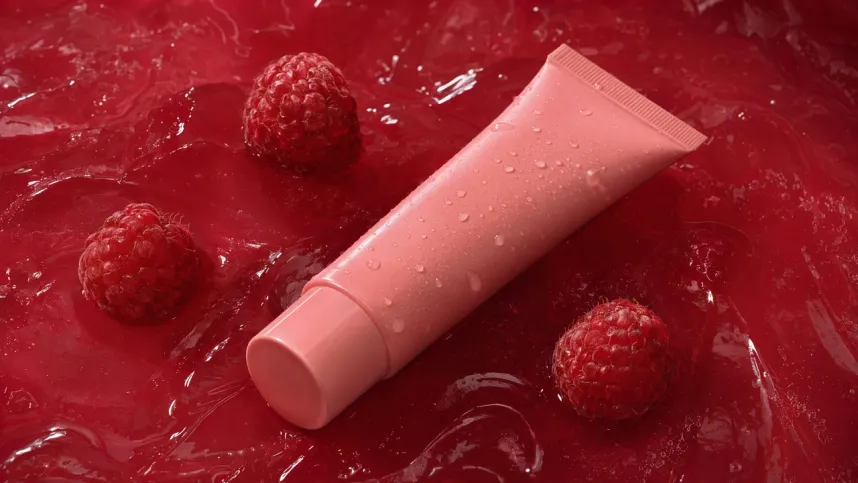
These are historical case records from October 10, 2026, made through the external Token168 route using dreamina-seedance-2-0-260128. The archived B report described the rotation as exceeding the request for “only a few degrees.” That is the report's assessment, not a new measurement in this article or evidence that labelled clauses caused the difference.
| Recorded approach | What it helps you decide |
|---|---|
| A: continuous paragraph | Whether the requested product and camera movement match the shot brief |
| B: labelled motion clauses | Whether separating instructions makes the next edit easier to describe |
| C: mostly static product | Whether a quieter direction still meets the creative requirement |
These records support a practical editing comparison, not a claim that labelled prompts are more effective or that one approach wins across models.
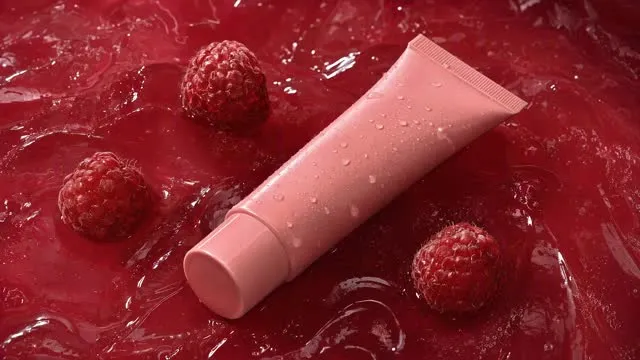
If a brief requires rotation, replacing it with a still product and moving light may create an attractive shot, but it changes the brief. Make that choice deliberately. Do not call the new direction a solution to a movement it no longer attempts.
The editorial observations used here come from sampled frames. They support discussion of pose and composition at those checkpoints, not a success rate or a conclusion about every frame. The reference has no product label, so it does not demonstrate text or logo fidelity. The examples were recorded through an external generation route and do not demonstrate a TakeWeave.ai website workflow.
Review the video as a sequence
Watch from beginning to end before judging a single frame. Then inspect:
- Product appearance: outline, proportions, closures, and visible details.
- Movement: whether the subject and camera do what the brief asks.
- Background: whether secondary motion distracts from the subject.
- Continuity: unexpected cuts, jumps, or changes in appearance.
- Ending: a usable final pose and composition.
Save the timecode of the largest mismatch. “The product is cropped at three seconds” is more useful for the next revision than “the result looks wrong.”
Revise one decision at a time
If the movement feels too large, simplify the action and describe a smaller visible change. If the camera introduces an unwanted angle, try a fixed-camera direction. If the source image conflicts with the intended movement, change the source rather than adding contradictory instructions.
Save the reference, prompt, settings, output, and review notes together. This makes the next attempt easier to compare, while leaving room for variation between generations.
For help planning a shot before choosing a reference, read the AI video prompt guide.
Frequently asked questions
Should I describe the image again?
Focus on motion. Repeat a visible detail when it helps identify the subject, preserve something important, or explain a planned change.
How do I keep a product from changing shape?
Start with a clear reference, request simple motion, and review the full sequence. Check important views against real product images. No wording guarantees perfect geometry.
Should the product move or should the camera move?
Choose according to the brief. A product turn is useful when showing another angle matters; a fixed product can suit a shot focused on preserving the visible composition.
Why is my image-to-video prompt not working?
Check the source image, conflicting instructions, movement complexity, and model-specific controls. Identify one visible mismatch before writing a longer prompt.
Put your reference to work
Choose the movement that serves your image, write a simple prompt, and review the result against the shot you planned.